SGGly predicts candidate N-linked glycosylation sites from a protein three-dimensional structure. The server evaluates all asparagine (Asn/N) residues in the submitted structure and reports candidate sites together with a prediction score, an interactive structural visualisation, and downloadable results.
SGGly is intended as a computational prediction tool. The reported sites are predictions and should not be interpreted as experimental confirmation. No account, registration, or login is required.
Single-Protein Submission
To run a prediction on a single protein, click Run in the top navigation bar. Three input methods are available, each on its own tab: PDB, ALPHAFOLD2, and UPLOAD.
PDB tab — search by PDB accession
Enter a four-character PDB accession code (e.g. 1GZW) in the search field
and click Submit. SGGly retrieves the structure directly from the Protein Data Bank.
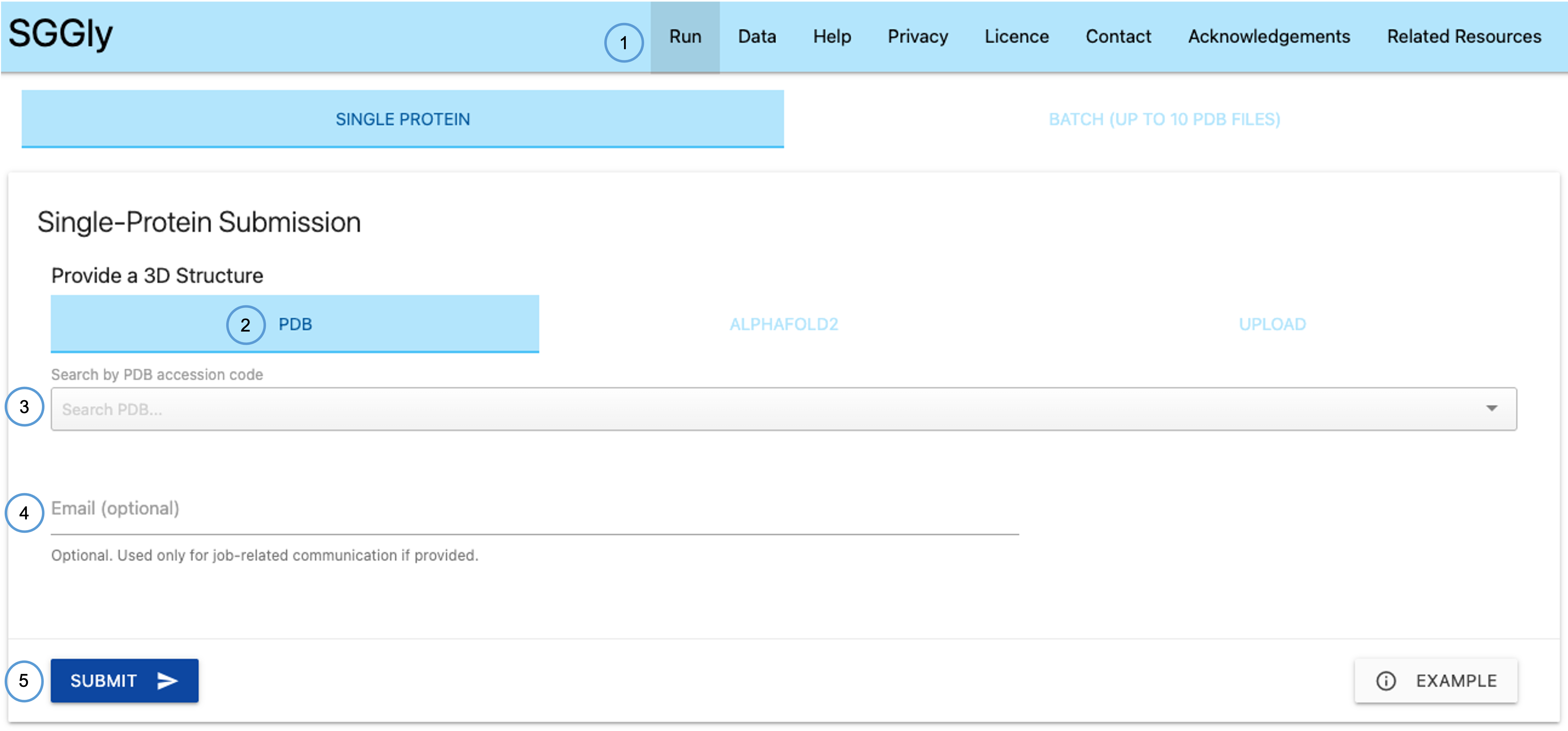
- Run — opens the submission page from the navigation bar.
- PDB tab — select this tab to submit by PDB accession code.
- Search PDB field — enter the four-character PDB ID here.
- Email (optional) — provide an email address if you wish to be notified when your job completes.
- Submit / Example — click Submit to start the prediction, or Example to load a prebuilt example job.
AlphaFold2 tab — search by UniProt accession
Enter a UniProt accession code (e.g. P09564) in the search field.
SGGly downloads the corresponding AlphaFold2 model from the AlphaFold Protein Structure Database.
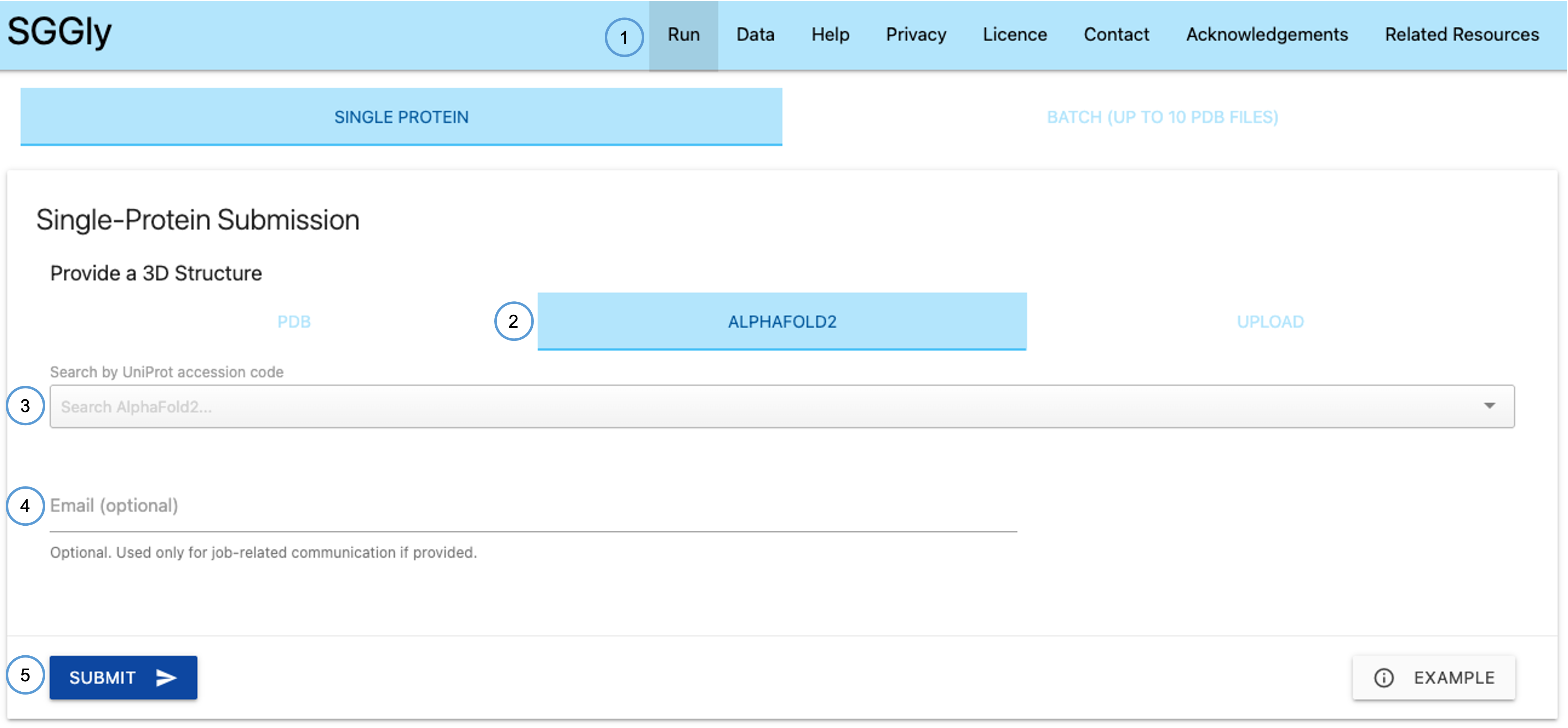
- Run — opens the submission page.
- AlphaFold2 tab — select this tab to submit by UniProt accession.
- Search UniProt field — enter the UniProt accession code here.
- Email (optional) — optionally provide an email address.
- Submit / Example — start the prediction or load the example.
Upload tab — upload a local PDB file
If you have a local structure file, switch to the UPLOAD tab and click the upload button to select a file in PDB format from your computer. Files must be in standard PDB format; mmCIF and other formats are not supported.
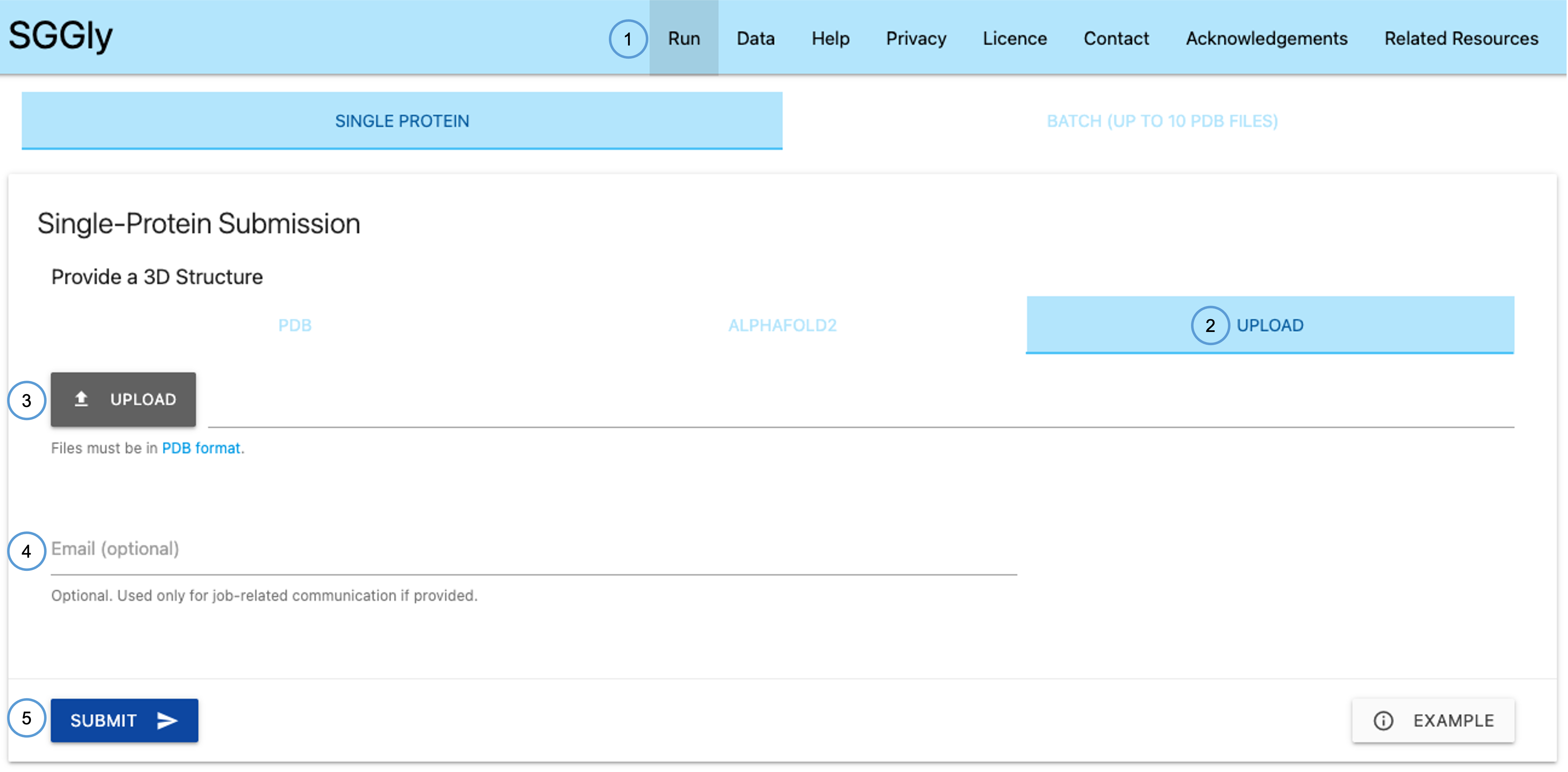
- Run — opens the submission page.
- Upload tab — select this tab to upload a local structure file.
- Upload button — click to browse and select a
.pdbfile from your computer. - Email (optional) — optionally provide an email address.
- Submit / Example — start the prediction or load the example.
Prediction Results
Once the job completes, SGGly displays a Prediction Outcomes page. This page contains a candidate-site table, an interactive 3D viewer, and a structural feature panel for predicted glycosylation sites.
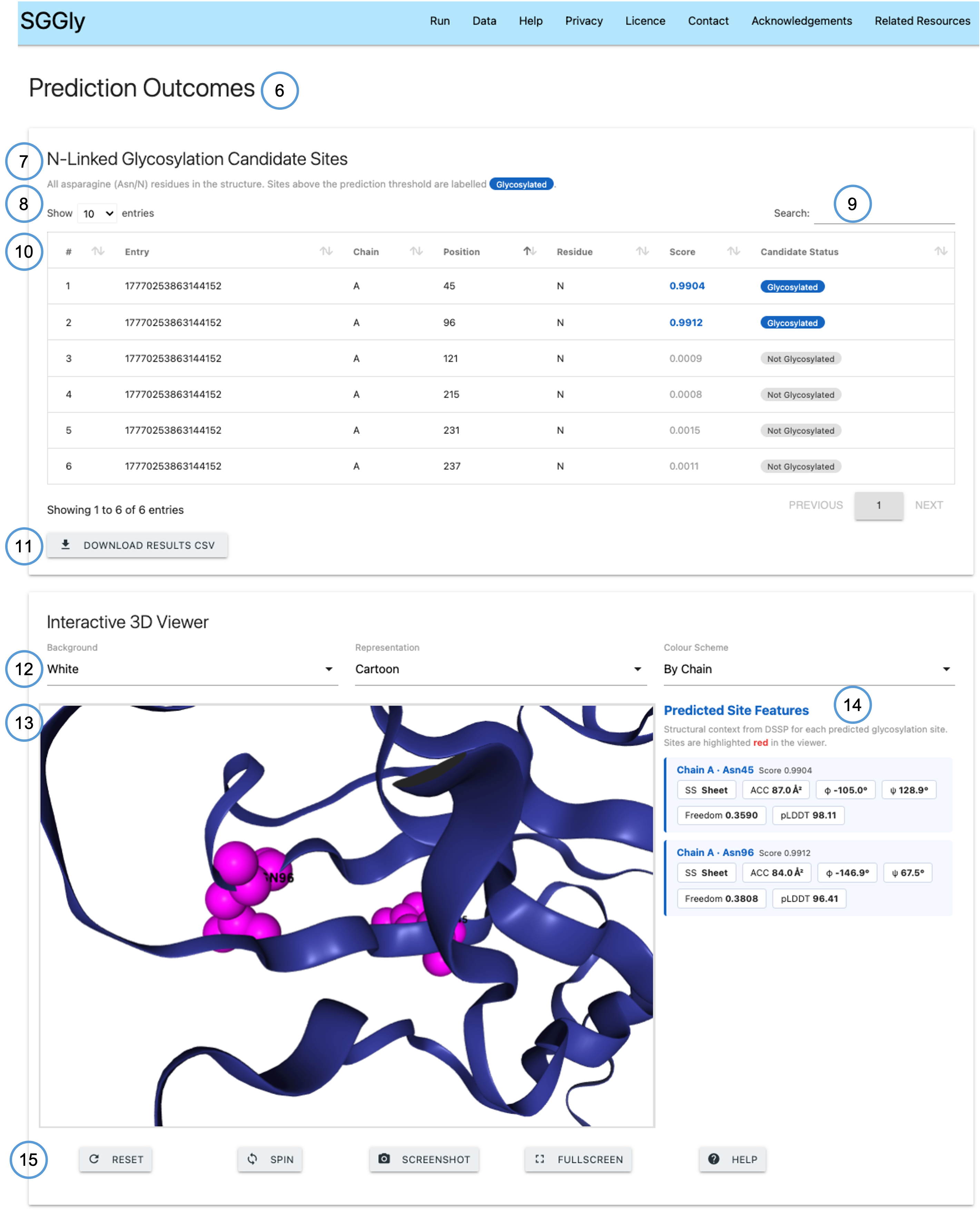
- Page title — confirms the Prediction Outcomes page for your job.
- Table heading — N-Linked Glycosylation Candidate Sites table listing all Asn residues found in the structure.
- Badge legend — sites above the prediction threshold (0.5) are labelled Glycosylated in blue; others are labelled Not Glycosylated.
- Search — filter the results table by any column value.
- Show entries — control how many rows are displayed per page.
- Download CSV — download the full prediction results as a CSV file.
- Viewer controls — dropdowns to change background colour, molecular representation, and colour scheme.
- 3D viewer — interactive NGL.js viewer showing the submitted structure with predicted glycosylation sites highlighted in red.
- Predicted Site Features — panel listing structural context for each predicted site (see below).
- Viewer buttons — Reset, Spin, Screenshot, Fullscreen, and Help controls for the 3D viewer.
Results table columns
The results table reports the following columns for every asparagine residue in the submitted structure:
- Entry — the unique job identifier assigned to the submission.
- Chain — chain identifier from the PDB file.
- Position — residue sequence number as recorded in the PDB file.
- Residue — amino acid identity at this position (asparagine, N, for all reported candidates).
- Score — continuous candidate score assigned by SGGly, ranging from 0 to 1. Higher scores indicate greater predicted likelihood of N-linked glycosylation.
- Candidate Status — classification label: Glycosylated for residues with a score of 0.5 or above, and Not Glycosylated for residues below that threshold. The full table can be downloaded as a CSV file using the Download CSV button.
Predicted Site Features panel
For each residue predicted above the threshold, the Predicted Site Features panel reports the following structural descriptors derived from the submitted structure:
- SS — secondary structure assignment: Helix, Sheet, or Coil (computed using DSSP).
- ACC — solvent accessible surface area in Ų, a measure of how exposed the residue is to solvent.
- φ / ψ — backbone dihedral angles (phi and psi) in degrees, describing the local backbone conformation.
- Freedom — degree-of-freedom score, a normalised measure of local structural permissiveness computed from inter-residue distances. Higher values indicate greater local flexibility.
- pLDDT — AlphaFold per-residue confidence score (0–100), reported where available. Higher values indicate greater structural confidence.
Predicted candidate sites are highlighted in red in the 3D viewer for easy identification.
Interacting with the 3D viewer
The viewer supports standard mouse controls:
- Click + drag — rotate the structure.
- Right-click + drag — translate (pan).
- Mouse wheel — zoom in and out.
- Click on structure — centre the view on the selected region.
Use the Reset button to return the viewer to its default orientation and settings. The Spin button toggles continuous rotation. Screenshot saves a PNG image of the current view. Fullscreen expands the viewer to fill the browser window. The Help button (?) shows a quick-reference guide.
Batch Processing
SGGly supports batch processing of multiple PDB files in a single job. To access the batch mode, click Run in the navigation bar and select the BATCH tab.
Batch submission
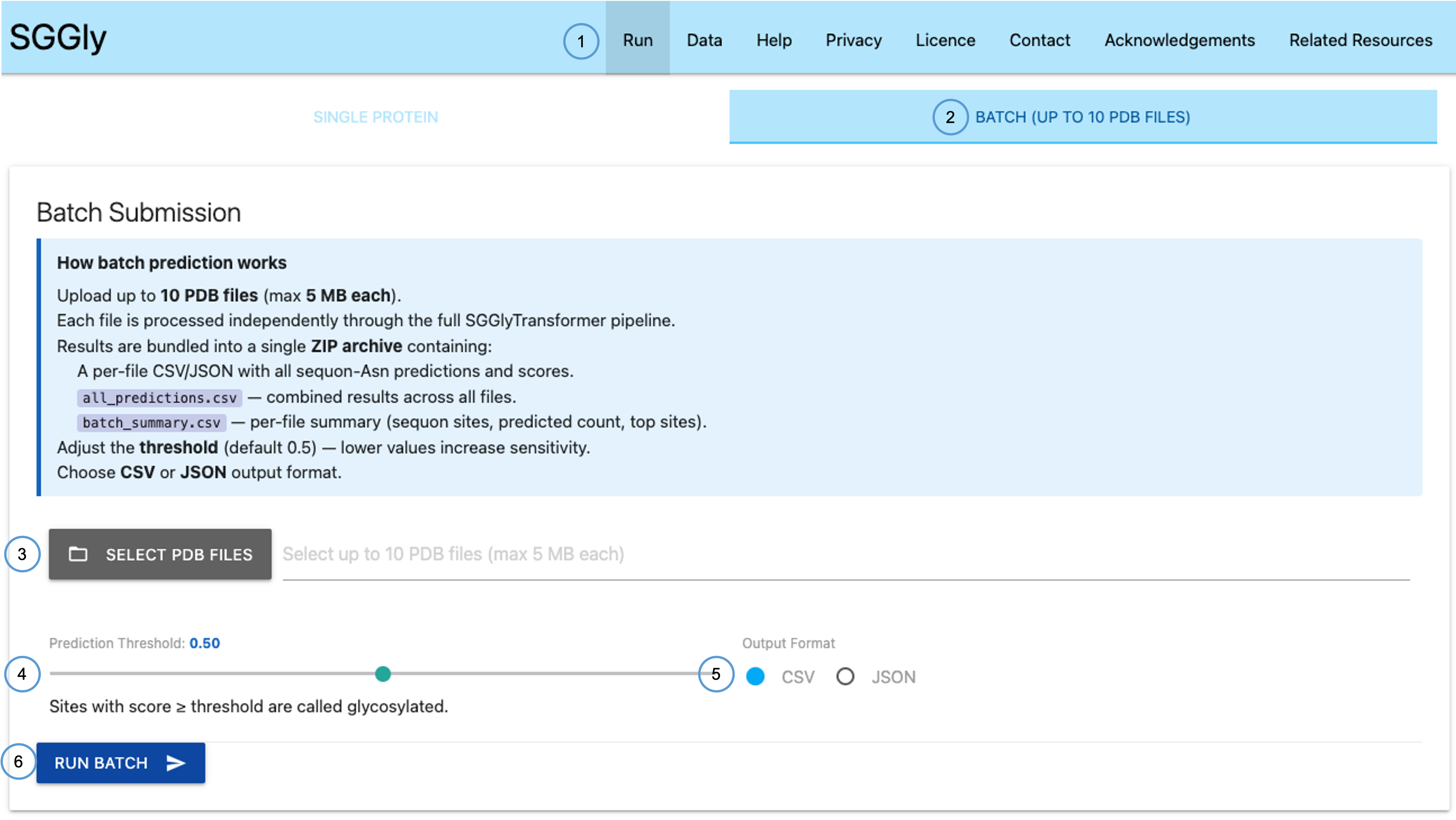
- Run — opens the submission page from the navigation bar.
- Batch tab — switch to this tab for multi-file submission.
- Select PDB Files — click to select one or more
.pdbfiles from your computer. - Threshold slider — adjust the prediction score threshold used to classify candidate sites as glycosylated (default 0.5).
- Output format — choose between CSV and JSON for the downloadable results file.
- Run Batch — submit all selected files for processing.
Batch results
When the batch job finishes, SGGly displays a Batch Prediction Results page summarising the outcome for all submitted structures.
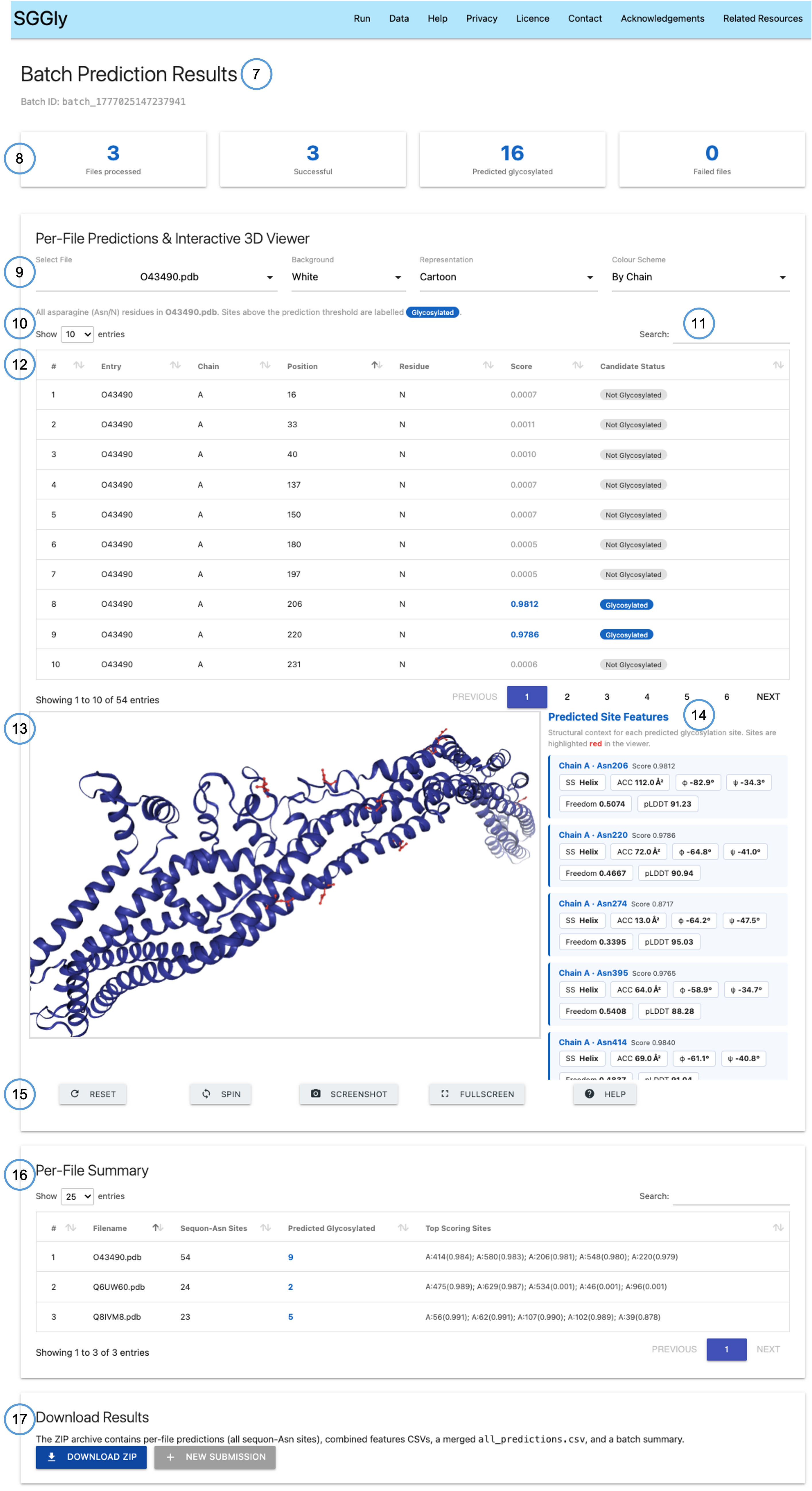
- Page title & Batch ID — confirms the Batch Prediction Results page and displays the unique identifier for this batch job.
- Summary cards — at-a-glance statistics: number of structures processed, total candidate sites identified, and number predicted as glycosylated.
- File selector & viewer controls — choose which structure to display in the 3D viewer, and adjust background, representation, and colour scheme.
- Show entries — control the number of rows shown in the per-file candidate table.
- Search — filter the per-file candidate-site table.
- Per-file candidate table — lists all Asn residues, scores, and glycosylation status for the currently selected structure. Columns are identical to the single-protein results table (Entry, Chain, Position, Residue, Score, Candidate Status).
- 3D viewer — displays the selected structure with predicted glycosylation sites highlighted in red.
- Predicted Site Features — structural context panel for predicted sites in the selected structure (SS, ACC, φ, ψ, Freedom, pLDDT — see above for definitions).
- Viewer buttons — Reset, Spin, Screenshot, Fullscreen, and Help controls for the 3D viewer.
- Per-File Summary table — overview table listing all submitted structures with their total candidate site counts and number of predicted glycosylation sites.
- Download ZIP — download a ZIP archive containing one CSV file per submitted structure. Each file follows the same column format as the single-protein CSV (Entry, Chain, Position, Residue, Score, Candidate Status).
Limitations
- SGGly provides computational predictions of candidate N-linked glycosylation sites and does not provide experimental confirmation.
- Prediction quality depends on the quality and suitability of the submitted structure.
- Predictions should be interpreted in the context of available structural and biological evidence.
- Uploaded structure files must be in standard PDB format; mmCIF and other formats are not currently accepted.
Privacy and data retention
No account, registration, or login is required to use SGGly. Email submission is optional.
Submitted data are used only for processing prediction jobs and displaying the corresponding results. Submitted files and generated results may be retained on the server for operational purposes. Users should avoid submitting confidential, proprietary, or sensitive personal data unless they are satisfied with the applicable handling arrangements for the service.
Citation
If you use SGGly in your research, please cite the associated SGGly publication .
Contact us
If you experience any problems using SGGly, please contact us via email or via our group website.